


Dicebet Mobile App: Android, iOS And Browser Access

Dicebet App: What The Sources Say
Whether Dicebet has a dedicated app depends on whom you ask. The operator’s site shows Android and iOS links in its top menu, with installation through a QR code; LCB.org says an app is available; Gamblescope, by contrast, reports no dedicated app. The difference may reflect the time each review was written, the country it was written from, or a different understanding of what counts as an app — a downloadable Android file, a Home Screen shortcut, or a store listing.
Source Comparison
| Source | What it reports |
|---|---|
| Operator’s site (top menu) | Android and iOS links; installation via QR code |
| LCB.org | App available |
| Betpack | App for Android and iOS, downloaded by scanning a QR code |
| Gamblescope | No dedicated app |
| MagicClick.partners (BRL/AZN marketing page) | Mobile-optimised site; no dedicated app mentioned |
| Mobile browser | Works; no source disputes this |
There is no published data on the Dicebet APK version, file size or the minimum Android and iOS versions supported (no data). No source disputes that the casino opens in a mobile browser, which makes the browser the baseline option on any phone. The Dicebet app links are an addition to that baseline, not a requirement.
Dicebet App Reports Compared: QR Code Or Browser Only?
The sources split into two camps. Betpack describes an app for Android and iOS that is downloaded by scanning a QR code, which matches the Android and iOS links with QR-code installation in the operator’s top menu; LCB.org also says an app is available. Gamblescope shows no dedicated app, and MagicClick.partners — an affiliate page for the BRL/AZN markets — describes a mobile-optimised site without mentioning an app. None of the sources names a Google Play or App Store listing, and none publishes the developer name, version or size of the file (no data).
Two Readings Of The Same Mobile Offer
| Point | Betpack / operator menu / LCB.org | Gamblescope / MagicClick.partners |
|---|---|---|
| Dedicated app | Yes, Android and iOS | No dedicated app shown / not mentioned |
| How it is installed | QR code from the operator’s site | Not applicable; mobile browser |
| Where to verify the link | QR code on the checked operator page only | Address bar of the mobile browser |
| Market version described | Betpack: not specified; LCB.org: AZN and other markets | TRY (Gamblescope); BRL/AZN (MagicClick.partners) |
| What works in any case | Mobile browser | Mobile browser |
One plausible explanation is that the “app” offered through the QR code is a downloaded Android file and, on iPhone, a web shortcut or profile rather than a store app — which a review site may or may not count as a dedicated app. This is an interpretation, not a confirmed fact; what the iOS link installs is not documented (no data).
Checks Before Installing Anything
- Confirm that online gambling is legal in the country of residence and that the user is 18 or older
- Open the operator’s site from a saved bookmark and check the domain before scanning or tapping any QR code
- Scan only the QR code shown on that checked page, never one from an advertisement, a chat or a social network
- After scanning, read the address the QR code opens before confirming the download
- On Android, check that the phone has free storage and an up-to-date system, and keep Play Protect on
- On iPhone, stop if the link asks to install a configuration profile or to trust an unknown developer
- Decide in advance that the mobile browser is the fallback if any of these checks fails
A QR code is only a shortcut to an address. It removes the step of typing a URL, but it also hides the URL until it is opened, which is why the address should be read before anything is downloaded.
Dicebet Mobile Access Options Compared
Three ways of reaching the site on a phone are described below. All of them use the same account, cashier and game lobby; the difference lies in installation, updates and the risks involved.
Options At A Glance
| Option | Device | Installation | Updates | Main risk | Best for |
|---|---|---|---|---|---|
| Mobile browser | Android and iPhone | None | Automatic with the site | Fake look-alike domains | Any phone; no installation and always the current site |
| Android APK | Android | File download from the operator’s site | New file from the operator’s site | Modified files from third-party sources | Android users who want a separate icon, if every check passes |
| Home Screen shortcut | iPhone (Safari), also Android browsers | A few taps | Automatic with the site | Shortcut created on a fake domain | iPhone users who want an app-like window without installing software |
The sources do not publish the APK version, file size, minimum OS or supported browsers, so these are checked on the phone itself. For most users the browser or a Home Screen shortcut covers the same functions as an app. The Dicebet APK may be preferred by those who want a separate icon and window on Android, but it is also the option that needs the most care, because it involves installing a file from outside the Google Play Store.
Dicebet Mobile Setup Steps
The steps below cover opening the site in a mobile browser, installing the Android file from the operator’s link and creating an iPhone shortcut. The numbers on the diagrams mark the area to tap in each step.
- 1
Open the site in the browser
Open the phone’s browser, go to the operator’s site and check the domain in the address bar before signing in.
- 2
Install the Android file from the operator’s link
Tap the Android link in the top menu or scan the QR code shown on the desktop site, allow unknown sources only for this installation and switch the permission off afterwards.
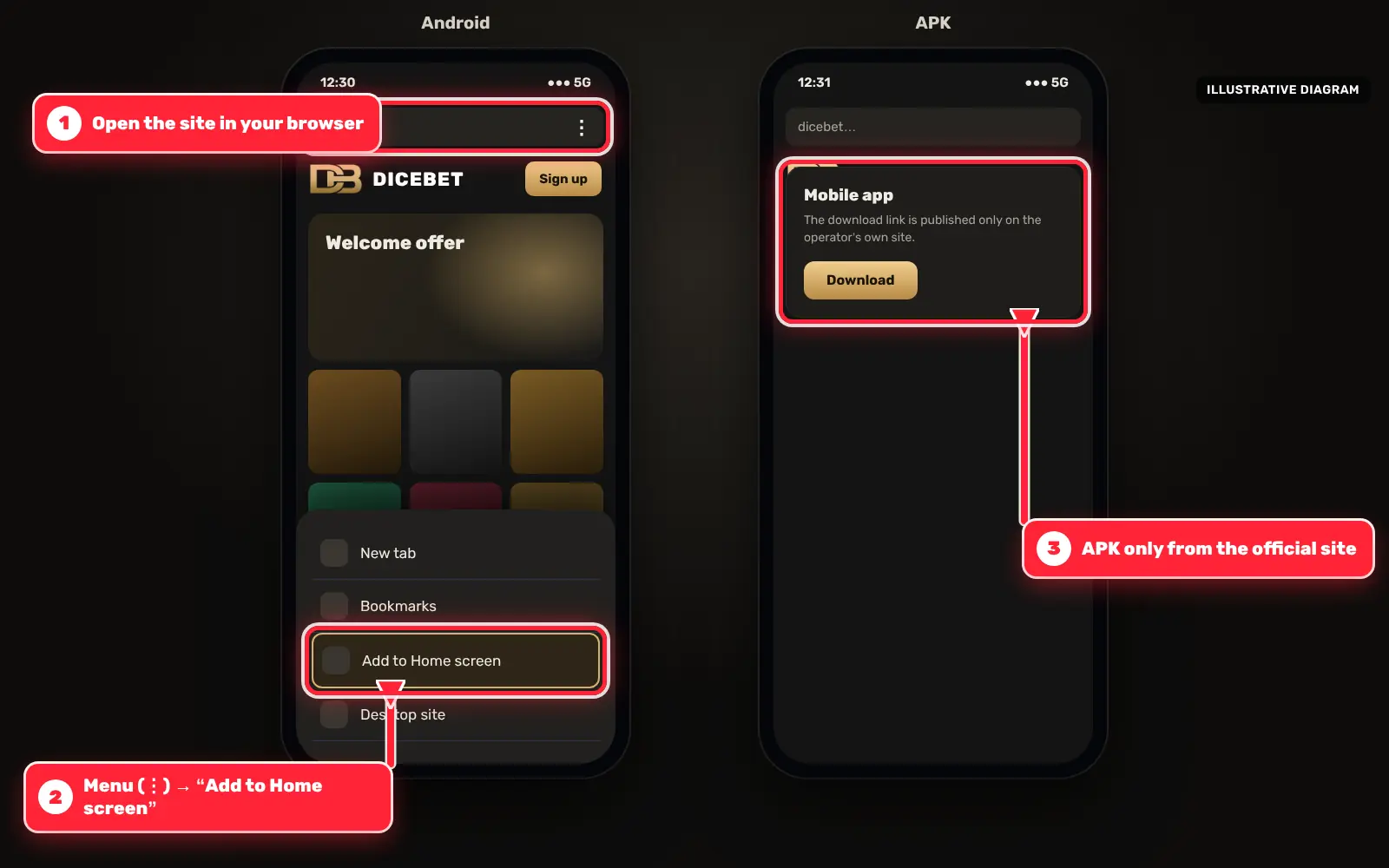
Android phone with the Dicebet mobile site and the Android link marked with red arrows - 3
Add the iPhone shortcut
In Safari, tap the Share icon, choose Add to Home Screen and confirm with Add.
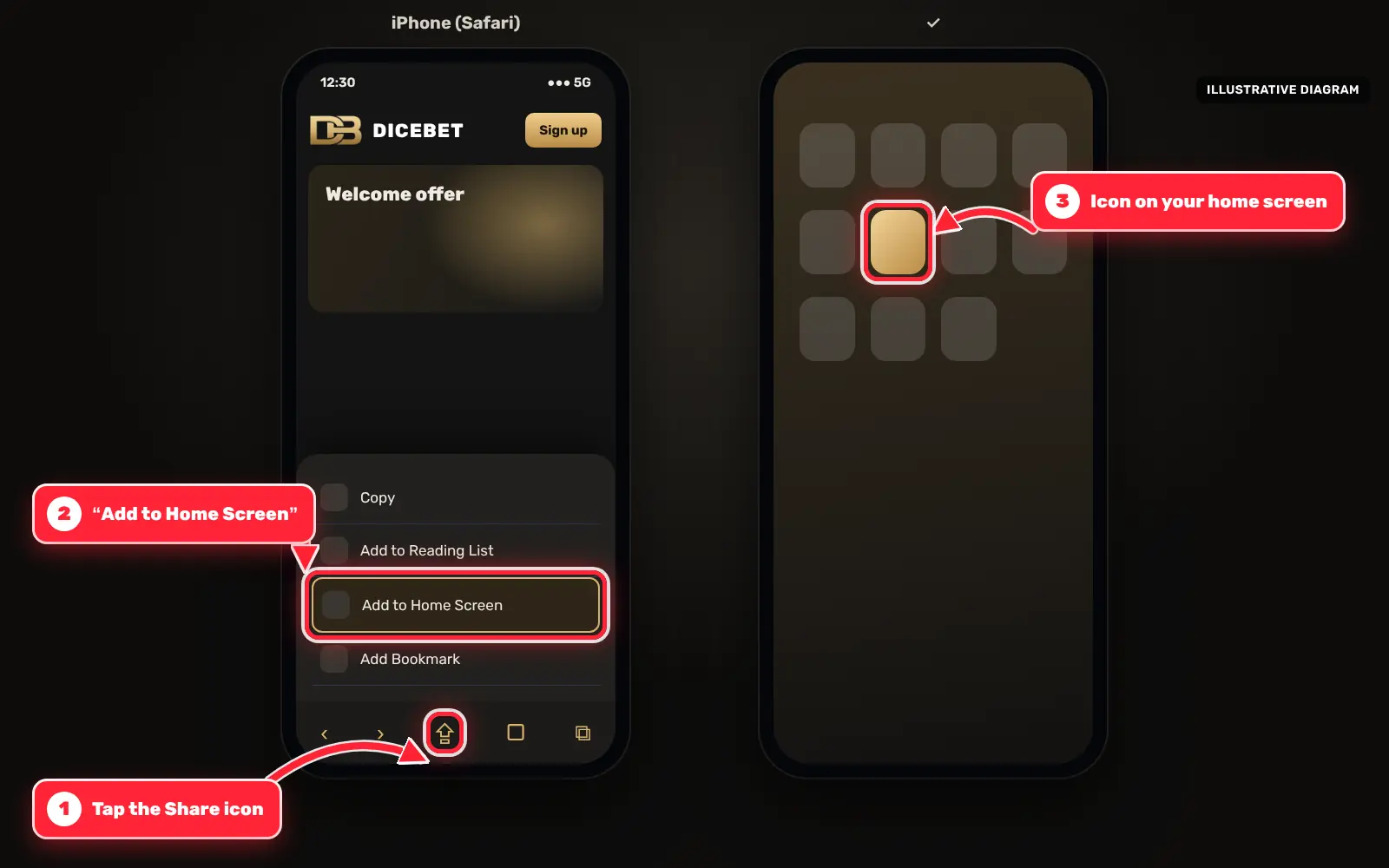
iPhone Safari with the Share icon and the Add to Home Screen option marked with red arrows - 4
Sign in and set limits
Open the new icon, sign in with your details and set a daily time limit in the phone’s settings.
Dicebet APK: Safety Checklist For Android
An APK is an installation file for Android. Because it is installed outside the Play Store, it does not pass through the store’s review, and modified copies circulate on file-sharing sites and forums. A Dicebet APK should be downloaded only from the link on the operator’s own site, never from a third-party mirror, a messaging channel or an advertisement.
Before Installing
- Check the domain in the address bar before tapping the Android link
- Do not install a file received through a chat, e-mail or social network
- Compare the file name with what the operator’s page shows
- Keep Google Play Protect switched on
During And After Installation
- Allow installation from unknown sources only for the browser used, and only for this installation
- Switch the permission off again once the app is installed
- Stop the installation if the app asks for SMS, contacts, call logs or accessibility access
- Take a Play Protect warning seriously; it means the file is not recognised or looks harmful
- Install updates only from the operator’s site, not from links in pop-ups
A Play Protect warning appears for many files installed outside the store, but it should not be dismissed automatically. If there is any doubt about where the file came from, deleting it and using the browser version is the safer choice.
Dicebet iOS: Home Screen Shortcut Through Safari
iPhone users can create a Home Screen shortcut for the site through Safari. The shortcut opens the casino in its own full-screen window, similar to a progressive web app. It installs no software; it is a bookmark with an icon. The operator’s menu also has an iOS link; whether it leads to an App Store listing, a profile or a shortcut is not confirmed by the sources (no data), so the shortcut is described here as one option among others.
Creating The Shortcut
- Open Safari and go to the operator’s site; check the domain in the address bar
- Tap the Share icon at the bottom of the screen
- Choose Add to Home Screen
- Keep or edit the name and tap Add
- Open the site from the new icon
If an iOS link asks to install a configuration profile or to trust an unknown developer in the settings, that is a significant step for the phone’s security. Using the Safari shortcut instead avoids it.
Dicebet Mobile Play: Data, Battery And Limits
On a phone, data use depends mainly on the game type. Slots and crash games use comparatively little data after loading, while live dealer tables stream video continuously. The operator publishes no figures for data use per hour or loading times (no data).
Practical Tips
- Play live tables over Wi-Fi where possible
- Close the session properly on shared devices and avoid saved passwords there
- Use Screen Time on iPhone or Digital Wellbeing on Android to set a daily limit
- Turn off promotional notifications if they lead to unplanned sessions
Phones make it easy to play in short, frequent sessions, which can add up. Gamblers Connect reports that self-exclusion, deposit limit and reality check tools are missing at the operator, so device-level limits are a useful substitute.
Dicebet Mobile Troubleshooting
Most problems on a phone have simple causes. The table lists common situations and what usually helps; the operator’s 24/7 live chat (Turkish and English, according to Gamblescope) or [email protected] can help with account-specific questions. There is no phone support, according to LCB.org and Gamblers Connect.
Common Problems And Fixes
| Problem | Possible cause | What usually helps |
|---|---|---|
| Site does not load | Weak connection or a block in the country | Check the network; a block signals legal risk |
| Android file will not install | Unknown sources not allowed or file corrupted | Download again from the operator’s link |
| Play Protect blocks the app | File not recognised or flagged | Delete it and use the browser version |
| Login fails | Wrong password or blocked cookies | Reset the password, allow cookies for the site |
| Live tables freeze | Unstable mobile data | Switch to Wi-Fi or lower the video quality |
| Shortcut opens a different site | Created on a wrong domain | Delete it and create it again from the checked domain |
If none of these steps helps, the mobile browser on another device is a quick way to see whether the problem is with the phone or with the account.
Dicebet Mobile: Licence, Legal Status And Current Terms
Licence data is inconsistent. Gamblescope lists Curaçao licence OGL/2024/635/0818 as verified; LCB.org names the Curaçao Gaming Authority; Gamblers Connect refers to the Curaçao Gaming Control Board, advises confirming the current details and has blacklisted the brand over delayed or declined payments; Casino.Guru stated on 11.06.2024 that the casino operates without an official licence. An app or shortcut does not change any of this.
- Gambling is for adults only (18+)
- Check whether online gambling is legal where you live; if the site is blocked in your country, that is a legal risk signal
- Download links, app availability and terms can change; the operator’s current T&C apply
- Free support is available from BeGambleAware (gambleaware.org)
Frequently Asked Questions
Is there a Dicebet app?
Sources disagree. The operator’s menu shows Android and iOS links with QR-code installation and LCB.org reports an app, while Gamblescope reports no dedicated app. The mobile browser version works in any case.
Where can I download the Dicebet APK safely?
Only from the Android link on the operator’s own site, after checking the domain. Files from third-party sites or chats can be modified.
What does a Play Protect warning mean?
It means Google does not recognise the file or considers it potentially harmful. If the origin of the file is uncertain, delete it and use the browser version.
Is there a Dicebet app for iPhone?
The operator’s menu has an iOS link; what it installs is not confirmed. A Safari Home Screen shortcut is an alternative that installs no software.
What are the APK version and minimum Android requirements?
No data: version, file size and minimum operating system are not published by the sources.
Do the app and the browser use the same account?
Yes, the mobile options use the same account, cashier and game lobby; only the way of opening the site differs.
Why do some reviews say Dicebet has no app?
Betpack describes an Android and iOS app installed via QR code, while Gamblescope shows no dedicated app and MagicClick.partners mentions only a mobile-optimised site. No source names a store listing.
Rate Dicebet
The score is calculated only from visitor votes on this site.
No votes yet — be the first to rate.
Help and safer gambling