


Dicebet Registration: Account Setup And Secure Login

Dicebet Account Requirements: Age and Legal Check
Before any Dicebet register step, two questions come first: is the person 18 or older, and is online gambling legal where they live? The operator’s market is mainly Turkish-speaking, but a Curaçao licence does not make online casino play lawful in every country. In Turkey, unlicensed online gambling is prohibited under Law No. 7258, and playing carries legal risk, including administrative fines. If the site is blocked in a user’s country, that is a signal of legal risk rather than a technical obstacle.
The licence information itself is disputed: Gamblescope lists Curaçao licence OGL/2024/635/0818 and marks it “verified”, LCB.org and Gamblers Connect also name Curaçao, while Casino.Guru (11.06.2024) stated that the casino operates without an official licence. Before a Dicebet sign up or any other Dicebet register step, checking the site footer and the issuing authority takes only a few minutes and is worth doing. The operator is named as Advanced Sports Entertainment N.V.
Checklist Before Opening an Account
- Age: 18 or older, confirmed later by KYC documents
- Legal status: online gambling permitted in the country of residence
- Licence: number in the footer matches the issuing authority’s records
- Terms: the operator’s current terms and bonus rules have been read
- Budget: a fixed amount that can be lost without affecting daily life
Dicebet Sign Up Form: Fields and Tips
The registration form opens from the sign-up button in the top right corner of the operator’s site. The form shown in the screen diagram asks for an e-mail address, a password and the account currency, and requires confirmation of the terms and of being 18 or older. The exact set of fields can change and may differ by country; additional personal details are usually requested in the profile or during verification. Entering data exactly as it appears on an ID document avoids problems later, because the operator compares the two during KYC.
Sign-Up Form Fields
| Field | Recommendation | Note |
|---|---|---|
| An active address the user controls | Confirmation and password-reset links are sent here | |
| Password | At least 12 characters, unique to this site | A password manager helps |
| Currency | The currency of the intended payment method | Gamblescope lists TRY, AZN, USDT, mBTC and uBTC; usually cannot be changed later |
| Name and date of birth | Exactly as on the ID document | Compared during KYC |
| Phone number | The user’s own number | SMS check not confirmed by sources; keep the number long-term for recovery |
| Promo code | Optional | Only codes listed in the operator’s own campaign terms |
| Terms and 18+ confirmation | Read before ticking | Required to finish the Dicebet sign up |
Personal data is processed under the operator’s privacy policy; how long it is stored and where is not published by independent sources (no data). The steps below walk through the Dicebet register process from the form to the first login and the KYC upload, with the numbered screen diagrams.
- 1
Open the site and check the address
Open the operator’s site from a saved bookmark, check the domain in the address bar and press the sign-up button in the top right corner.
- 2
Fill in the sign-up form
Enter your e-mail, a unique password and the account currency, then confirm the terms and that you are 18 or older.
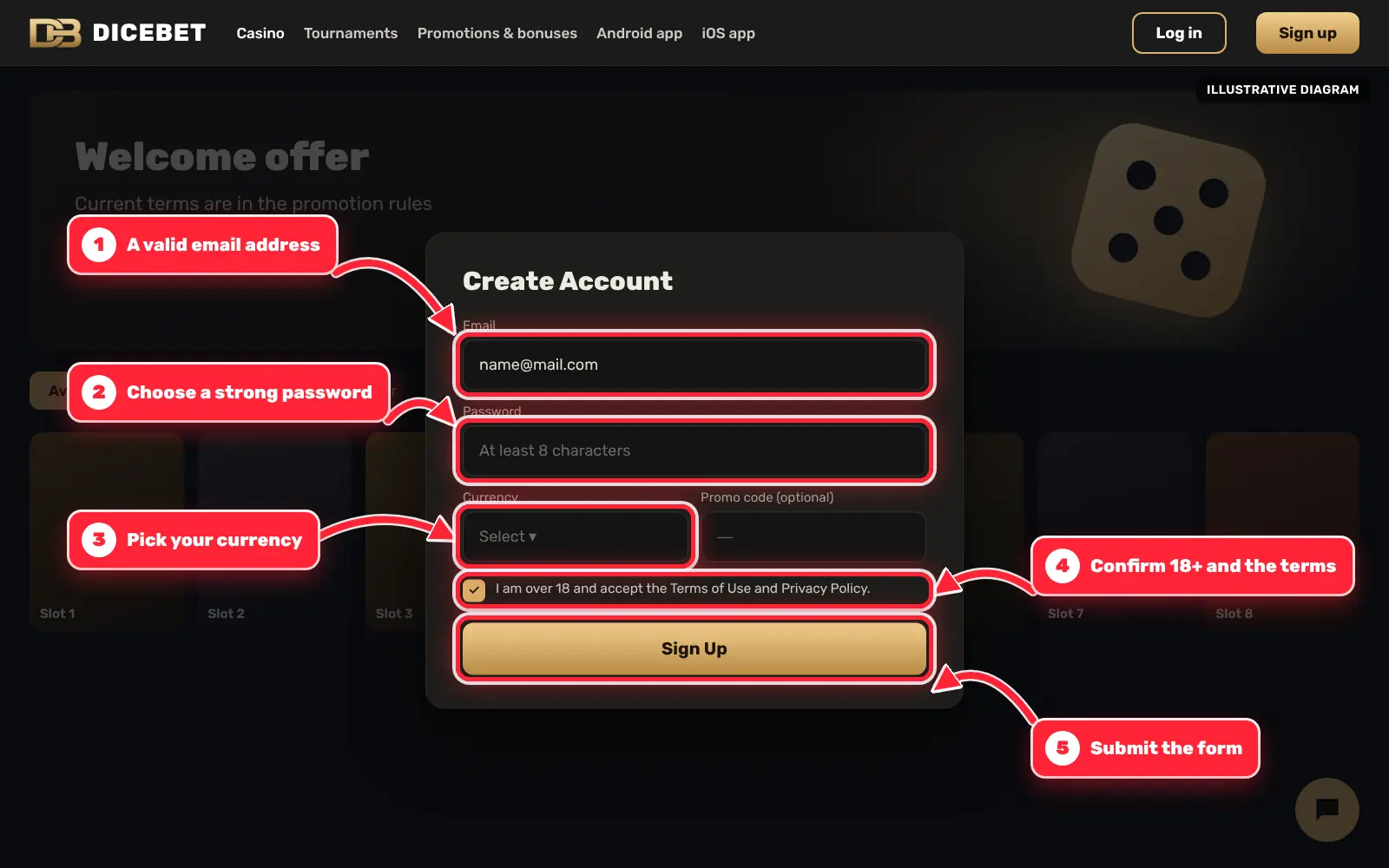
Dicebet sign-up form with e-mail, password, currency and 18+ confirmation marked by red arrows - 3
Confirm your e-mail
Open the confirmation link sent to your e-mail to activate the account; check the spam folder if it does not arrive.
- 4
Log in
Press the login button in the top right corner and enter your e-mail or username and password, paying attention to upper and lower case.
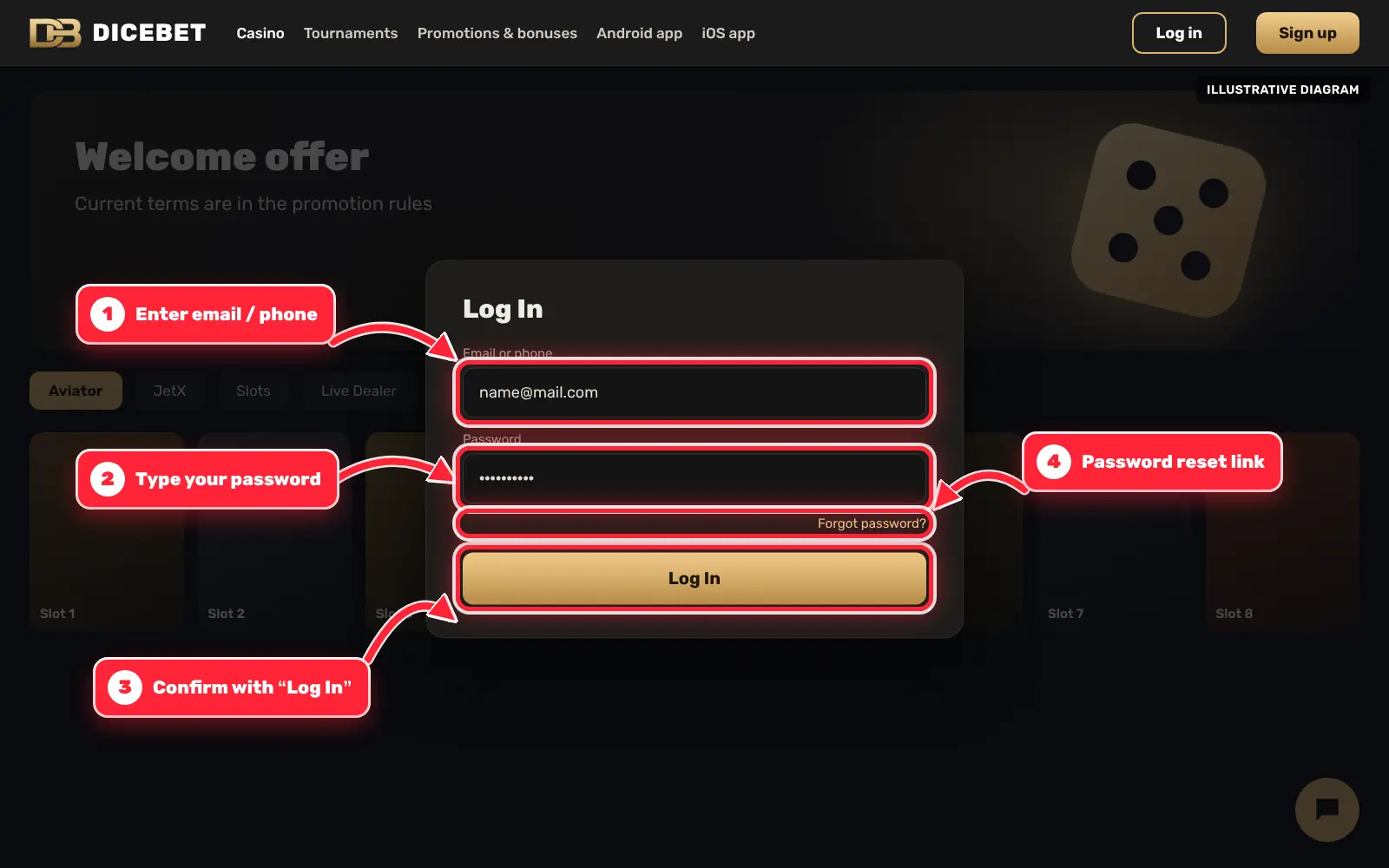
Dicebet login window with e-mail, password and login button marked by red arrows - 5
Upload KYC documents
In the verification section of your profile, upload your ID document, proof of payment method and a selfie with ID before your first withdrawal.
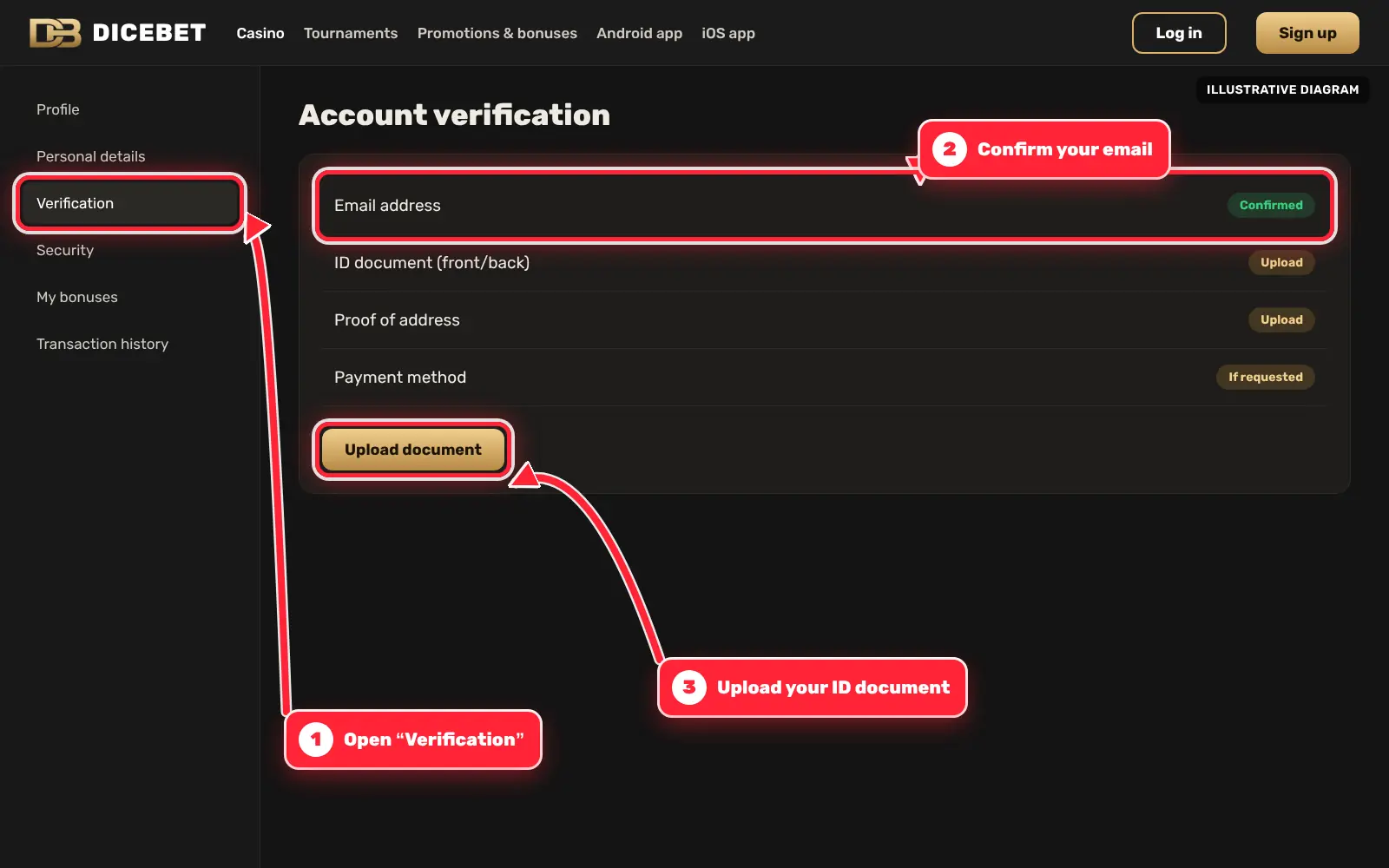
Dicebet account verification screen with the document upload button marked by a red arrow
Dicebet Email and Phone Verification
After the form is sent, a confirmation link usually arrives by e-mail. Clicking it activates the account. If no message arrives within a few minutes, the spam or promotions folder is the first place to look; the address can also be re-checked in the profile. Whether the link expires, and after how long, is not published (no data).
Phone verification by SMS may be requested for some actions, but no source confirms whether it is mandatory at registration (no data). A number the user owns and keeps should be used, because a lost number can make account recovery harder. Messages that ask for a verification code by chat or phone call should be ignored: legitimate codes are only entered on the operator’s own site.
If the Confirmation E-mail Does Not Arrive
- Check the spam, junk and promotions folders
- Confirm that the e-mail address in the profile is spelled correctly
- Request a new confirmation link if the option is shown
- Contact live chat or [email protected] if nothing arrives
Dicebet KYC Documents: What to Upload
Identity verification is required before payouts and may also be requested for other account actions. LCB.org describes the documents and a dedicated upload page in the account. The review time is not published (no data), so uploading documents soon after registration, rather than at the moment of the first withdrawal, avoids waiting later.
Documents Listed by LCB.org
| Document | Examples | Tips |
|---|---|---|
| Identity document | ID card, passport or driving licence | Valid, all four corners visible, no glare |
| Proof of payment method | Document showing the user owns the card, wallet or account used | Sensitive numbers may be partly covered if the operator allows it |
| Selfie with ID | Photo of the user holding the ID document | Face and document both readable |
| Further documents | Only if requested by the operator | Requirements are set in the operator’s terms |
The most frequent reasons for rejection are blurry photos, cropped edges, expired documents and names that do not match the account. A rejected document can usually be re-uploaded after correcting the problem. Documents should only ever be sent through the upload page on the operator’s site, never through social media or messaging apps.
Dicebet KYC Timing: At Registration or Before Payments?
Sources describe the moment of verification differently. MagicClick.partners, an affiliate network page that describes the BRL/AZN markets, states that there is no KYC at registration: an account can be opened with the basic form alone. Gamblescope, which reviews the TRY version, reports that KYC is required for deposits and withdrawals. Both can be true at the same time — no documents at sign-up, but documents before money moves — and the practical conclusion is the same: verification will be needed before the first payout at the latest, so the account data should match the ID document from the start.
| Stage | What is reported | Source | Practical meaning |
|---|---|---|---|
| Registration | No KYC at registration | MagicClick.partners (BRL/AZN markets, marketing source) | The account opens without documents |
| Deposits | KYC required | Gamblescope (TRY version) | Documents may be requested before or soon after the first deposit |
| Withdrawals | KYC required | Gamblescope; LCB.org lists the documents | A payout is not released before verification |
| Review time | No source gives a duration; general: 24–72 hours is common at Curaçao casinos | General industry practice, not a Dicebet figure | Upload right after sign-up; ask live chat for the status after 72 hours |
Country eligibility is also part of the registration check. MagicClick.partners states that registration is not available in the USA, and Gamblescope reports that US players are not accepted and USD is not supported. Other restricted countries are listed in the operator’s terms; an account opened from a restricted country can be closed and its balance withheld under the terms. Registration-stage support problems also appear in public complaints: a Şikayetvar title reads “Dicebet Kayıt Sürecinde Cevapsız Kalma Ve Çevrim Dışı Yanıt Sorunu” (no answer during registration and an “offline” reply problem). Only the title was reviewed; the details are unverified.
Dicebet Login and Password Recovery
The Dicebet login button sits in the top right corner of the site. After entering the e-mail or username and the password — both case-sensitive — the user is taken to the lobby. Repeated failed attempts may trigger a CAPTCHA or a temporary lock; the exact number of attempts is not published (no data). On shared devices the “remember me” option should stay off and the session should be closed with “log out”.
Password Recovery Steps
- Open the login window and choose the “forgot password” link
- Enter the e-mail address used at registration
- Open the reset link from the e-mail (how long it stays valid: no data)
- Set a new, unique password
- Log in again with the new password
If the registered e-mail address is no longer accessible, password recovery has to go through support, and identity checks may be needed. This is one more reason to complete KYC early and keep the account e-mail active.
Dicebet Account Security Habits
Most account takeovers start on the user’s side: a reused password, a phishing link or a shared device. A few habits reduce that risk considerably. Whether the operator offers two-factor authentication (2FA) is not confirmed by the sources; users should check whether the operator offers it in the account settings and switch it on if it is available.
Recommended Habits
- Use a password that is not used on any other site
- Check whether the operator offers 2FA, and enable it if so
- Type the address manually or use a saved bookmark instead of links from messages
- Never share passwords or verification codes, including with “support” contacts on messengers
- Log out on shared devices and do not let the browser save the password there
- Review the transaction history regularly and report unknown activity to support
Infrastructure security on the operator’s side, such as encryption standards or penetration tests, is not documented by independent sources (no data). A padlock icon in the browser only shows an encrypted connection, not that the site behind it is trustworthy.
Dicebet: The First 10 Minutes After Sign-Up
The minutes right after a Dicebet sign up decide how smoothly the account will work later. Most payout delays described in complaints are easier to avoid at this stage than to fix once a withdrawal is pending. The list below is a practical order of steps; none of them requires a deposit.
- Confirm the e-mail address through the link and check that the account currency is the intended one (Gamblescope lists TRY, AZN, USDT, mBTC and uBTC)
- Complete the profile with name and date of birth exactly as on the ID document
- Open the verification page and upload the ID document, and later proof of the payment method and a selfie with ID (documents per LCB.org)
- Look for responsible gambling settings such as deposit limits; Gamblers Connect reports that self-exclusion, deposit limit and reality check tools are missing, so note what the account actually offers
- Check whether 2FA is offered in the security settings and switch it on if it is
- Ask live chat one concrete question — for example the minimum withdrawal for the chosen method — and save the answer
- Read the current bonus terms before accepting any offer, because an active bonus can restrict withdrawals
- Save the operator’s address as a bookmark and use only that bookmark to log in
Testing support before the first deposit is especially useful given the complaint titles about unanswered chats. A clear, dated answer in the chat transcript is also useful evidence if a dispute arises later.
Dicebet Common Login Problems
Most Dicebet login problems have simple causes. The table below lists the usual ones. Advice to switch DNS, use a VPN or hunt for “mirror” addresses is deliberately not given here: if the site is blocked in a country, that block reflects local law and is a sign of legal risk.
Problems and Solutions
| Problem | Likely cause | What to do |
|---|---|---|
| “Wrong password” | Typo, caps lock, old password | Re-type carefully or reset the password |
| Account temporarily locked | Too many failed attempts | Wait, then reset the password or contact support |
| Confirmation e-mail missing | Spam filter or wrong address | Check folders, correct the address, request a new link |
| Page does not load | Connection or browser cache | Check the connection, clear the cache, try another browser |
| Access blocked in the country | Legal restriction | Do not try to bypass it; it signals legal risk |
| Login page looks different | Possible phishing copy | Close it, open the site from a saved bookmark, change the password if it was entered |
Players must be 18 or older and should check whether online gambling is legal where they live. Registration rules, fields and verification requirements can change, and the operator’s current terms and conditions are the reference. Help with gambling problems is available from BeGambleAware (gambleaware.org).
Frequently Asked Questions
What is the minimum age for a Dicebet sign up?
Registration is only for people aged 18 or over, and the operator checks age during KYC. Users should also check whether online gambling is legal where they live.
Which documents are needed after the Dicebet register step?
According to LCB.org: an ID card, passport or driving licence, proof that the payment method belongs to the user, and a selfie with the ID document, uploaded on a dedicated page.
How long does KYC verification take?
The review time is not published (no data). Uploading clear documents right after registration avoids delays at the first withdrawal.
What should I do if the Dicebet login fails?
Check the spelling and caps lock, then use the “forgot password” link. If the account is locked, wait or contact live chat or [email protected].
Does Dicebet offer two-factor authentication?
The sources do not confirm it (no data). Check the account settings to see whether the operator offers 2FA and enable it if it is available.
Can I open more than one account?
Casino terms usually allow one account per person, and duplicate accounts can lead to closure and cancelled bonuses. The operator’s current terms set the exact rule.
Can I register on a phone?
Yes, the site works in mobile browsers, and the operator’s menu also shows Android and iOS links. The steps are the same as on a desktop.
Is KYC required when registering at Dicebet?
MagicClick.partners (BRL/AZN markets) reports no KYC at registration, while Gamblescope (TRY version) reports KYC for deposits and withdrawals. Uploading documents early avoids a wait at the first payout.
Rate Dicebet
The score is calculated only from visitor votes on this site.
No votes yet — be the first to rate.
Help and safer gambling